
Cube of spheres, the studio mark

12 years building custom software

A client portal that answers the email your customers keep sending

Where is my order, what do I owe, where is that document from March, can you resend the invoice. Every one of those is a person waiting for a person. A portal turns them into a page — and gives you back the hours your team spends retyping what a database already knows.

See our work
Client Portal//Client Portal//Client Portal//Client Portal//Client Portal//Client Portal//Client Portal//Client Portal//Client Portal//Client Portal//Client Portal//Client Portal//Client Portal//Client Portal//
Sound familiar

Your team is a search interface for your own data

  • “Half of support is people asking where their order is.”

    Not a support problem — a visibility problem. Every one of those messages is a customer who would rather have looked it up, and an employee reading a status out of a system the customer cannot see.

  • “We email the same documents over and over because nobody can find the old ones.”

    Documents scattered across mailboxes have no owner and no history. The question is never whether you sent it — it is which version, and to whom, and when.

  • “Clients call the manager they know instead of using any system.”

    They will keep doing that until the system is faster than the call. That is a design target, not a policy: if the portal takes longer than a phone call, the phone call wins forever.

  • “Our data lives in three systems and the client sees none of them.”

    This is the real work of a portal: not a new database, but one honest window onto the ones you already have. Most of the effort is in the joins, not the screens.

The first version

One place your customers can answer their own questions, in eight weeks

from $14,000
Fixed against a scope agreed before we start. Cheaper than a full internal system because a portal has one audience and one job — it shows people their own data and lets them act on a little of it.
Eight weeks
From first call to a portal your customers log into and use on their real data.

What you get

  • Sign-in that survives real life: reset, expiry, someone using the same account from two devices
  • The status of whatever your customers wait for — orders, tickets, applications, deliveries
  • Documents and invoices, with history, downloadable without asking anyone
  • One action they can take themselves: request, upload, approve or pay
  • Notifications by mail, in the wording you would use rather than the default
  • A view for your side: what a client sees, and the ability to fix it when it is wrong
  • Reading from the systems you already run instead of a second copy of the truth

What is not included

  • Replacing the systems behind it — a portal is a window, not a warehouse
  • A public marketing site: different job, different page, often a different supplier
  • Native mobile apps in version one; a responsive portal covers a phone properly
  • Chat and ticketing — mature products exist and integrate well
  • Rebuilding your accounting rules. We display what accounting says, and say where it came from
717
automated checks on the browser side of the largest system we run
3
dimensions access resolves across at once — brand, branch, city
2
products of ours you can open and use right now
What ends up built

What goes into the first eight weeks, and what waits

The scope question for a portal is not what to show but what a customer may change. Reading is cheap and safe; writing touches the systems that run your business. We start with the one action that removes the most email and leave the rest until real use shows what it should be.

Which journeys go into which stage of the work
JourneyFirst eight weeksPhase twoNot us
Accounts, sign-in and the states around itInvitation, reset, expiry, a client whose contact person left. Dull, unavoidable, and the first thing that goes wrong when skipped.Covered · First eight weeksNot covered · Phase twoNot covered · Not us
Status of the thing they are waiting forOrder, ticket, application, shipment. The single highest-value screen: it removes the most common message you receive.Covered · First eight weeksNot covered · Phase twoNot covered · Not us
Documents and invoices with historyEvery version, dated, downloadable. Half of "please resend" disappears the week this ships.Covered · First eight weeksNot covered · Phase twoNot covered · Not us
One action the client can takeChosen in week one: place a request, upload a file, approve a quote, pay an invoice. One, done properly.Covered · First eight weeksNot covered · Phase twoNot covered · Not us
Reading from your existing systemsThe portal shows what accounting and the CRM already know. A second source of truth is how portals start disagreeing with reality.Covered · First eight weeksNot covered · Phase twoNot covered · Not us
Notifications people do not switch offWritten like a person wrote them, sent when something actually changed. Anything else trains customers to ignore you.Covered · First eight weeksNot covered · Phase twoNot covered · Not us
Payments inside the portalOften phase two: showing the balance removes most of the friction, and taking the money is a separate conversation with a provider.Not covered · First eight weeksCovered · Phase twoNot covered · Not us
Self-service beyond one actionWhich of these matters becomes obvious after a month of use, and guessing earlier means building the wrong three.Not covered · First eight weeksCovered · Phase twoNot covered · Not us
Replacing your CRM or accountingDifferent project entirely, and usually a worse idea than it sounds while standing next to a portal.Not covered · First eight weeksNot covered · Phase twoCovered · Not us
includednot in this stage

The split comes out of the first week. What does not move: read-only first, one write second, everything else after real use.

Count the emails before designing anything

The cheapest hour of this project is spent in your support mailbox with a tally. Where is my order, what do I owe, resend the invoice, who is my manager, when is the engineer coming — five categories usually cover most of the volume, and they tell you what the portal must answer on day one better than any workshop. It also gives you the number that justifies the spend: if two people spend half their day answering three questions, the portal has a payback you can calculate rather than assert.
A portal is mostly joins, not screens

The screens are the visible part and the cheap part. The work is that the order lives in one system, the invoice in another, the delivery note in a third, and the customer thinks of them as one thing. Building the window means reconciling identities across those systems — the same company spelled three ways, an order number that means something different in accounting — and deciding what to show when they disagree. That is why we read from the systems you have rather than copying data: a second copy diverges, and the day it does, the portal starts lying politely.

How we design data that survives the second year

The security question, answered plainly

A portal moves data from inside your walls to a login page on the internet, and that deserves more than a reassuring sentence. Practically: every request checks that this user may see this record — not the interface hiding a button, but the server refusing. Documents are served through the application rather than sitting at guessable addresses. Sessions expire, resets are single-use, and the tests include a user trying to open somebody else’s order. That last one is the check most often missing, and it is the one that ends up in the news.

The suite that covers those paths

Why the first version is read-only plus one

Every action a client can take is a path into your operational systems, and each needs rules: who may cancel, what happens to a paid order, which changes need approval. Build five of those at once and the project doubles while the value stays flat, because most of the relief comes from looking rather than doing. One write, chosen because it removes real work, is the honest first version. The second and third become obvious once people are actually using the thing.

What makes clients abandon a portal

Three things, in order. A login they cannot get past — reset that does not arrive, an invitation that expired, a contact person who left and took the account with them. Information that is stale or contradicts what the manager just said. And a task that is faster by phone. The first is engineering, the second is integration, the third is design, and losing on any of them sends everyone back to email — where the cost you were trying to remove quietly returns.

And what we do not do

  • We do not build a second copy of your data — the portal reads from the systems you already run
  • We do not put documents at addresses that can be guessed, whatever the deadline
  • We do not ship a portal without the test where one client tries to open another client’s record
  • We will not promise adoption. We can make the portal faster than a phone call; making people try it is your side
How it runs

Eight weeks, and something real at the end of each

The integration goes early, because it is the part that can be wrong. The screens are known quantities: they take time but they do not surprise anyone.

  1. Week 1

    The five questions and the one action

    We go through your support mailbox together and count what people actually ask. Out of that comes the list of screens and the single action worth building first.

    You seeA ranked list of what the portal answers, with the volume behind each line.

  2. Weeks 2–3

    Accounts and the shape of the data

    Sign-in, invitations, resets, and the join between your systems and one identity for the client. Deployed to a real address at the end of week three.

    You seeYou can invite a real client and they can sign in and see an empty portal.

  3. Weeks 4–5

    The read-only portal

    Status, documents, history — pulled from your systems rather than copied. This is the version that removes most of the email, and it exists halfway through the project on purpose.

    You seeA client can answer their three most common questions without writing to you.

  4. Week 6

    The one action

    Request, upload, approve or pay — with the rules about who may do it and what happens on your side when they do.

    You seeSomething that used to arrive as an email arrives as a record.

  5. Week 7

    Access testing and hardening

    The uncomfortable week: one client tries to reach another client’s data, sessions expire mid-action, documents are requested by guessed address. Everything that should be refused is refused, in tests that keep running afterwards.

    You seeA suite that fails loudly if anyone ever sees what they should not.

  6. Week 8

    Real clients, then handover

    A handful of friendly customers use it while we watch. Then the pipeline, runbook and accounts move to you, and your developer deploys it once with us watching instead.

    You seeEverything in your accounts, real clients inside, tests green on every push.

Runs with what you already use
  • QuickBooks
  • Xero
  • Stripe
  • Postmark
  • S3-compatible storage
  • PostgreSQL
  • GitHub Actions
What you keep

Three things a portal leaves behind it

The same artefacts as on every system of this size, taken from our own work rather than a template.

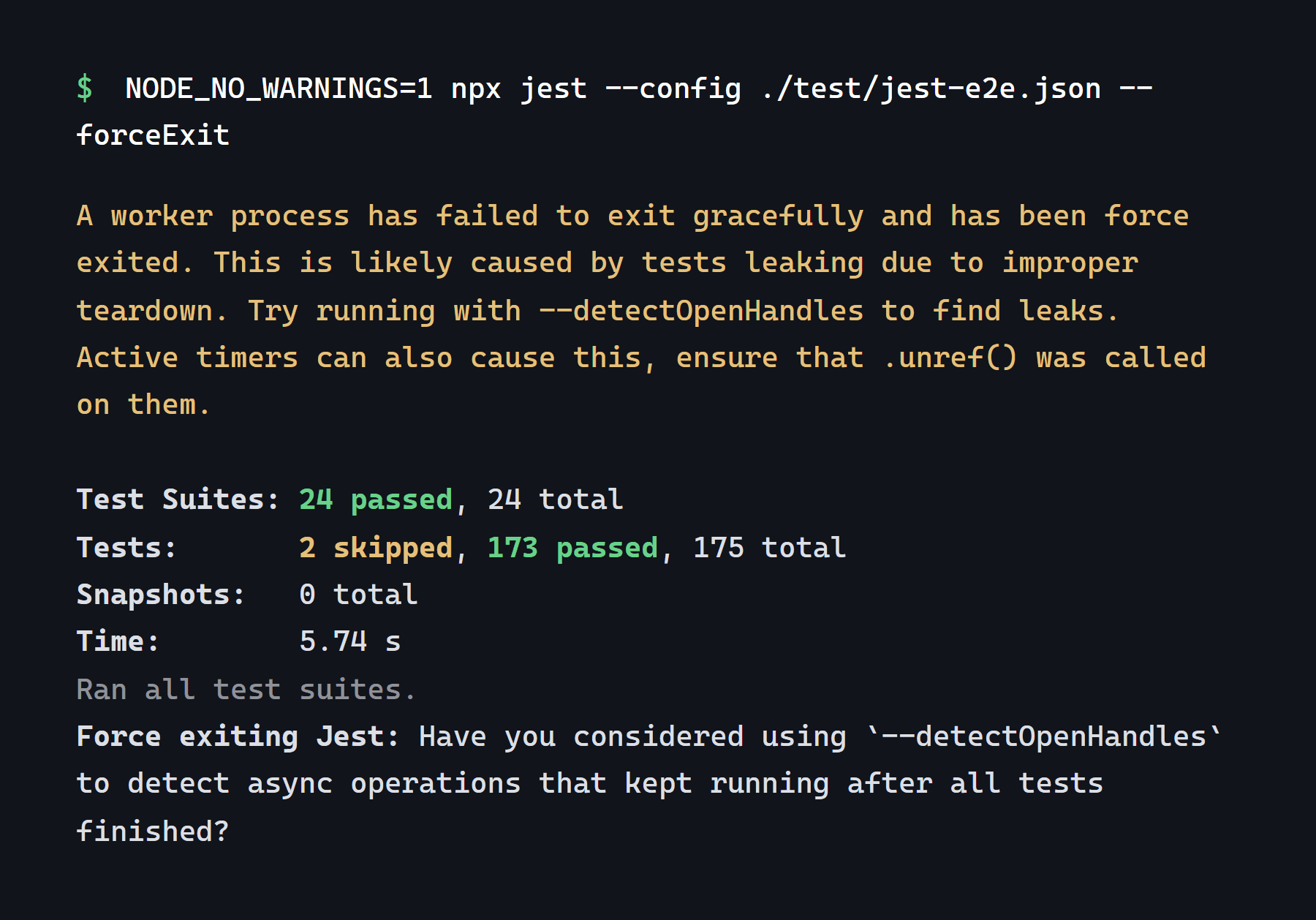
Terminal output: 24 suites passed, 173 tests passed, 2 skipped

Tests that guard other people’s data

The suite includes the paths nobody demonstrates: one client requesting another client’s order, a document fetched by guessed address, a session that expired mid-form. These run on every push, because access rules break silently and look fine from the inside.

jest over test/*.e2e-spec.ts in the marketplace we run, 21 August 2026

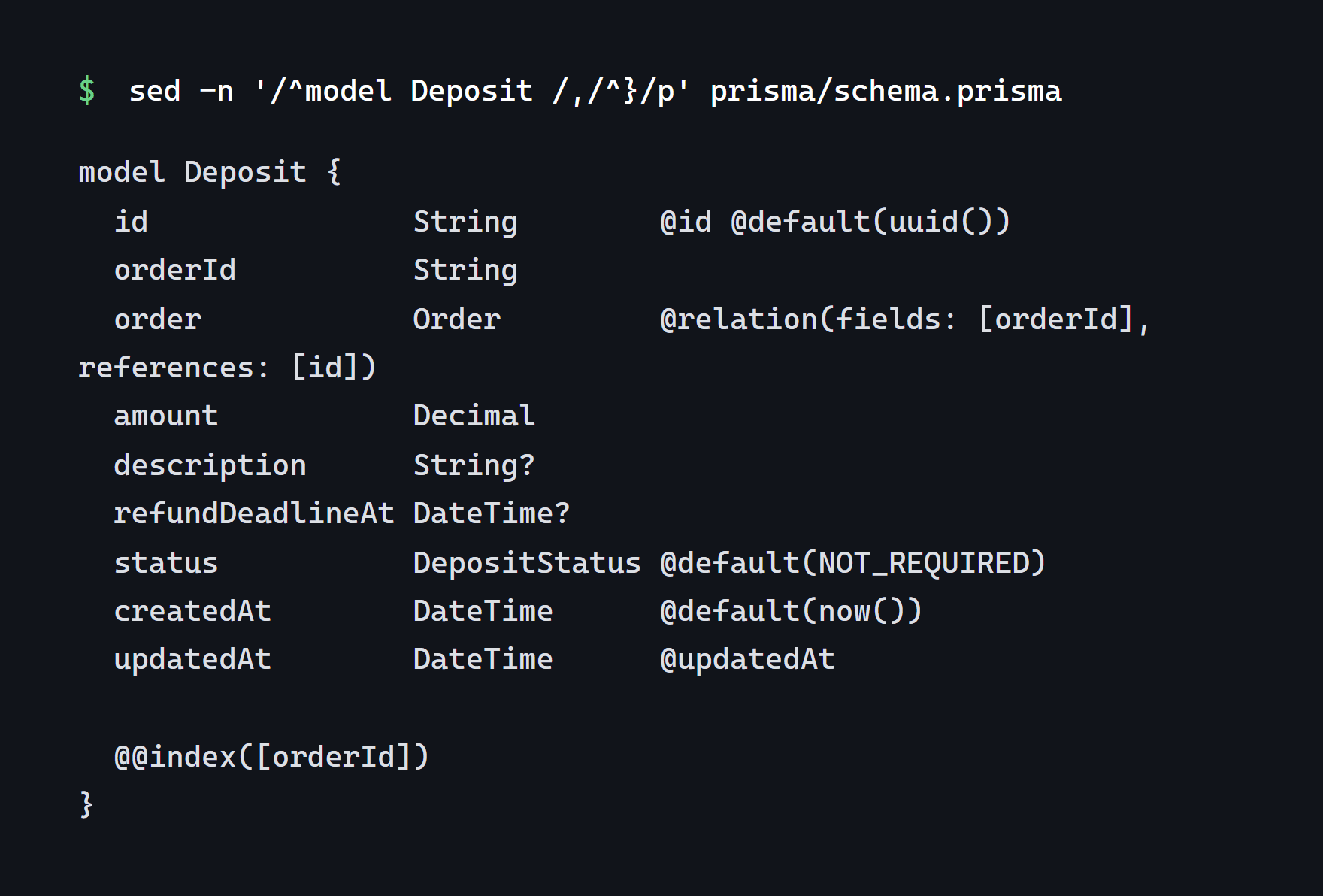
The Deposit model from schema.prisma: a decimal amount, a deadline, a status enum

A data model that says where each fact came from

A portal shows facts owned by other systems. The model records which system said what and when it was last read, so a disagreement between the portal and accounting is a question with an answer rather than an argument.

prisma/schema.prisma in the marketplace we run

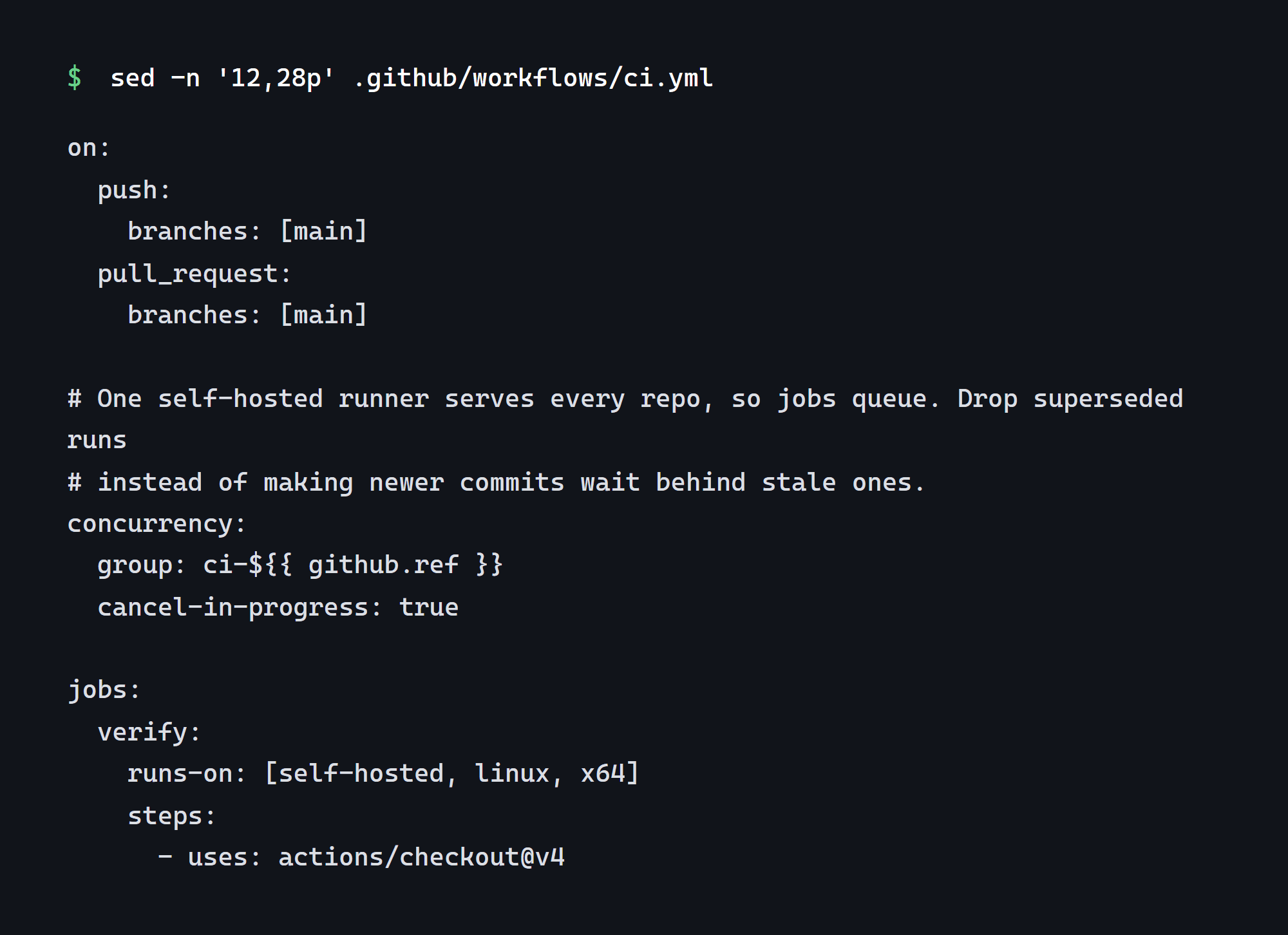
The workflow file of this site: what runs on every push to main

A pipeline that makes a release ordinary

Push, tests, deploy, and a rollback that has been used once in front of you. A portal your customers depend on should not be updated by one person from a laptop.

.github/workflows/ci.yml in this site’s own repository

Be honest with yourself

A portal pays for itself in some businesses and sits empty in others

Build this if

  • Your team answers the same handful of questions every day, and you could name them right now
  • Clients wait for something — an order, an application, an engineer — and ask about it
  • The data already exists in a system; it is just invisible to the people it is about
  • You have repeat customers rather than one-off buyers: a portal needs a reason to be revisited
  • Documents get emailed more than once, and finding the last version takes someone time
  • Somebody on your side can decide what a client may and may not change

Do not build this if

  • Customers buy once and never come back — there is nothing to log in for
  • The underlying data is not trustworthy yet. A portal broadcasts your data quality to the people it concerns most
  • The real problem is that three systems disagree. Fix that first; a portal will only publish the disagreement
  • You want it to replace the phone entirely. It will not, and the calls that remain are usually the ones worth having
  • Nobody will own it after launch, in which case stale data will make it worse than nothing

If that reads like a no, say so on the call. Sometimes the honest answer is a weekly status email built in two days, and it removes most of the same messages.

Questions we get about client portals

Short answers. The long ones happen on the call.

A first version starts at $14,000 for eight weeks, fixed against a scope agreed before we start. It is cheaper than a full internal system because a portal has one audience and one job. What moves the number is not the count of screens but the count of systems it has to read from: one is straightforward, three is most of the project.

That is the default, and we argue for it. A portal that keeps its own copy of orders and invoices will drift, and the day it drifts it starts contradicting your own staff. Reading from the source means the portal is always as right as the system behind it — which also makes any disagreement a question about that system rather than about the portal.

Then the portal will show that, and this is the most common reason we advise waiting. Publishing a status to the customer it belongs to is the strictest audit your data will ever get. Sometimes the right first project is cleaning up and joining the systems, with the portal as the second phase — and we would rather say that than build a beautiful window onto a mess.

Only if it is faster than sending you an email, which is a design target rather than a hope. In practice that means signing in has to be effortless, the first screen must answer the most common question without navigation, and notifications have to be worth reading. Adoption also depends on your side: the fastest route we have seen is answering the next few emails with a link rather than an answer.

Every request checks on the server that this user may see this record, rather than the interface hiding what it should not show. Documents are served through the application, not from guessable addresses. And the test suite contains the attempt — one client reaching for another’s order — so if a future change breaks that rule, the build fails rather than a customer discovering it.

Almost never in the first version. Portals are used in short visits to check something, and a responsive web page does that well on a phone without an install. If usage later shows people living in it daily, an app becomes a real question, and we quote it separately rather than folding it into a number you cannot examine.

Usually phase two, and often unnecessary sooner than you would think: showing an accurate balance and the invoice removes most of the friction on its own. Taking payment adds a provider, a reconciliation and a set of failure cases worth their own conversation — worth doing, and worth doing after the portal has proved it is used.

You do, from the first commit. Repository in your organisation, infrastructure in your accounts, and a handover rehearsed in week eight rather than posted after it. The honest test of ownership is whether you could carry on without us, which is easier to check than to promise.

Selected work

Systems where this pattern already runs

In both of these, someone outside the company logs in to see their own things — the same problem this page describes, at a larger size.

What a build like this costs, and how access gets tested

All articles
Web development

Why two studios quote the same project three times apart

You send one brief and get back three very different numbers. The spread is not greed — it is four different readings of the same sentences, and closing it is your job as much as theirs.

2 min read

Talk to us about client portal development

Tell us what you are building

A person reads it and answers within one business day — with a range and the assumptions under it.